
There are three ways to run a Shopify BigQuery integration: Google's own free connector, a managed ETL tool, or a custom pipeline on the Shopify API. For most brands under £10M revenue, the free native connector is the right starting point, and the whole warehouse costs under £10 per month to run. The hard part is not moving the data. It is deciding what "revenue" means once four systems each give you a different number for it.
This guide covers all three routes with current pricing, the schema you will actually receive, the reconciliation table that stops your numbers drifting, and an honest section on when a smaller store should not do this at all. If you'd rather have someone check your source data is even worth warehousing first, that's exactly what our free Data Audit Checklist walks you through.
PART 01Why you need a Shopify data warehouse before you need another dashboard
A Shopify data warehouse exists to answer questions that cross systems. Shopify can tell you what you sold. It cannot tell you what that revenue cost to acquire, because ad spend does not live in Shopify. That single boundary is the whole reason this article exists.
What Shopify analytics can and cannot answer
If we're being 100% honest, the Shopify analytics limitations that matter are architectural — most people fixate on the report that their plan unlocks instead.
Shopify's reporting queries Shopify data. It has no view of Meta ad spend, Google Ads cost, Klaviyo flow revenue, your 3PL's shipping invoices, or your payment processor's fee schedule. Upgrading your plan buys you more ways to slice one system, but it does not join that system to another one.
So the questions Shopify can answer on its own look like this:
- What were sales by product last month?
- What is average order value by region?
- Which discount code was used most?
And the questions it cannot answer, at any plan tier, look like this:
- What is contribution margin by acquisition channel after shipping, payment fees and returns?
- Which channel's customers have the highest 90-day repeat rate?
- What did we actually pay to acquire the cohort that is now producing 40% of our revenue?
Those are the questions that change budget decisions. Every one of them requires a table Shopify does not have.
The Shopify reporting limitations around saved custom reports and ShopifyQL do vary by plan, and the gating has changed more than once in the past two years. Sources disagree on the current state, so check Shopify's own reports documentation rather than a comparison table on a vendor site. It is worth knowing, but it is not the reason to build a warehouse.
PART 02How to connect Shopify to BigQuery: the three ingestion routes and what they cost
There are exactly three ways to connect Shopify to BigQuery. Every guide you will read on this ranks them differently depending on which one the author sells. Here they are ranked by what they cost you in money and time, with no product to push.
Route 1: the native BigQuery Data Transfer Service Shopify connector
Google publishes a BigQuery Data Transfer Service Shopify connector. It is the simplest way to export Shopify data to BigQuery with no code and no third party in the middle.
Per Google Cloud's own documentation, the connector schedules recurring transfer jobs that load GraphQL-based Shopify resources into BigQuery, and there is no cost to transfer Shopify data into BigQuery while the feature is in Preview. Supported objects include orders, customers, products, variants, inventory, collections, fulfilments, refunds, transactions, abandoned checkouts and metafields. Gift card objects require a Shopify Plus subscription, and some app subscription objects require the installed app to be a sales channel app.
Two caveats to hold onto. Preview status means the feature can change, and it means the free transfer is a Preview condition, not a permanent commitment. Check the current status on Google's documentation before you build a production dependency on it.
Competitors bury this route because it competes with the thing they are selling. For a brand whose only real requirement is getting Shopify into a warehouse, it is the correct first choice.
Setup, at a high level:
- In Shopify admin, create a custom app for your store and request only the read scopes for the objects you need.
- Generate the Admin API access token.
- In Google Cloud Console, create a BigQuery dataset.
shopify_rawis a sensible name. - Open BigQuery, go to Data transfers, click Create transfer, choose Shopify as the source.
- Enter your shop name and credentials, select your objects, set a schedule, and run a backfill for history.
Route 2: managed ETL, or the no-code Shopify BigQuery connector market
A managed Shopify BigQuery connector from a third party earns its money when Shopify is not your only source. If you also need Meta Ads, Google Ads, Klaviyo and your 3PL landing in the same project on the same schedule, one vendor managing all of them is worth paying for.
This is where the no-code Shopify BigQuery category sits. Pricing models differ enough that comparing sticker prices is misleading:
| Vendor | Model | Entry point |
|---|---|---|
| Fivetran | Monthly Active Rows | Free plan to 500,000 MAR/month. Paid connections carry a $5 base charge between 1 MAR and 1M MAR |
| Airbyte | Open source or credits | Core self-hosted is free, you pay infrastructure. Cloud Standard from $10/month including 4 credits, further credits $2.50 each |
| Coupler.io, Windsor.ai, Dataslayer and similar | Per-connection subscription | Entry tiers cluster in the $24–$50/month range, rising steeply with connection count |
Two honest notes. First, published entry prices for the smaller vendors vary between listings, so treat the band above as indicative and pull the current figure from the vendor on the day you buy. Second, usage-based pricing has one predictable failure mode: the initial historical backfill is the expensive month. Budget for it, then expect steady state to be far cheaper.
Route 3: a custom pipeline on the Shopify GraphQL Admin API
Building your own shopify graphql admin api bigquery pipeline gives you total control and costs you the one resource you cannot buy back, which is engineering attention every time Shopify ships a schema change.
If you go this way, two facts from Shopify's own API documentation will shape your design. Shopify's GraphQL Admin API uses a calculated query cost method, so apps can spend a maximum number of points per minute and more complex requests cost proportionally more. A single query cannot exceed a cost of 1,000 points, and exceeding it returns a MAX_COST_EXCEEDED error rather than partial data.
For fetching large amounts of data, Shopify directs you to bulk operations, which are designed for volume and are not subject to the max cost limits or rate limits that single queries carry. If you are backfilling three years of orders, bulk operations are not an optimisation. They are the only route that finishes.
Build this only if you have a genuine requirement that the first two routes cannot meet, such as event-driven webhook ingestion within seconds of an order.
Choosing between the three
| Native connector | Managed ETL | Custom pipeline | |
|---|---|---|---|
| Cost | Free during Preview | £20–£200+/month | Engineering time |
| Setup time | Under an hour | Under an hour/source | Two to six weeks |
| Sources covered | Shopify only | Shopify + ad platforms, email, ops | Anything you build |
| Maintenance | Google's problem | Vendor's problem | Your problem, forever |
| Right for | Shopify is the main gap | Four+ sources | Genuine real-time need |
Recommendation: start with the native connector plus the free GA4 BigQuery export. Add a managed ETL tool only when you have proven you need ad platform data in the same project, which is usually within a quarter.
PART 03What Shopify data lands in BigQuery, and what the schema actually looks like
This is the section that decides whether you finish the build. The data arrives in a shape that is correct for an API and wrong for a spreadsheet brain.
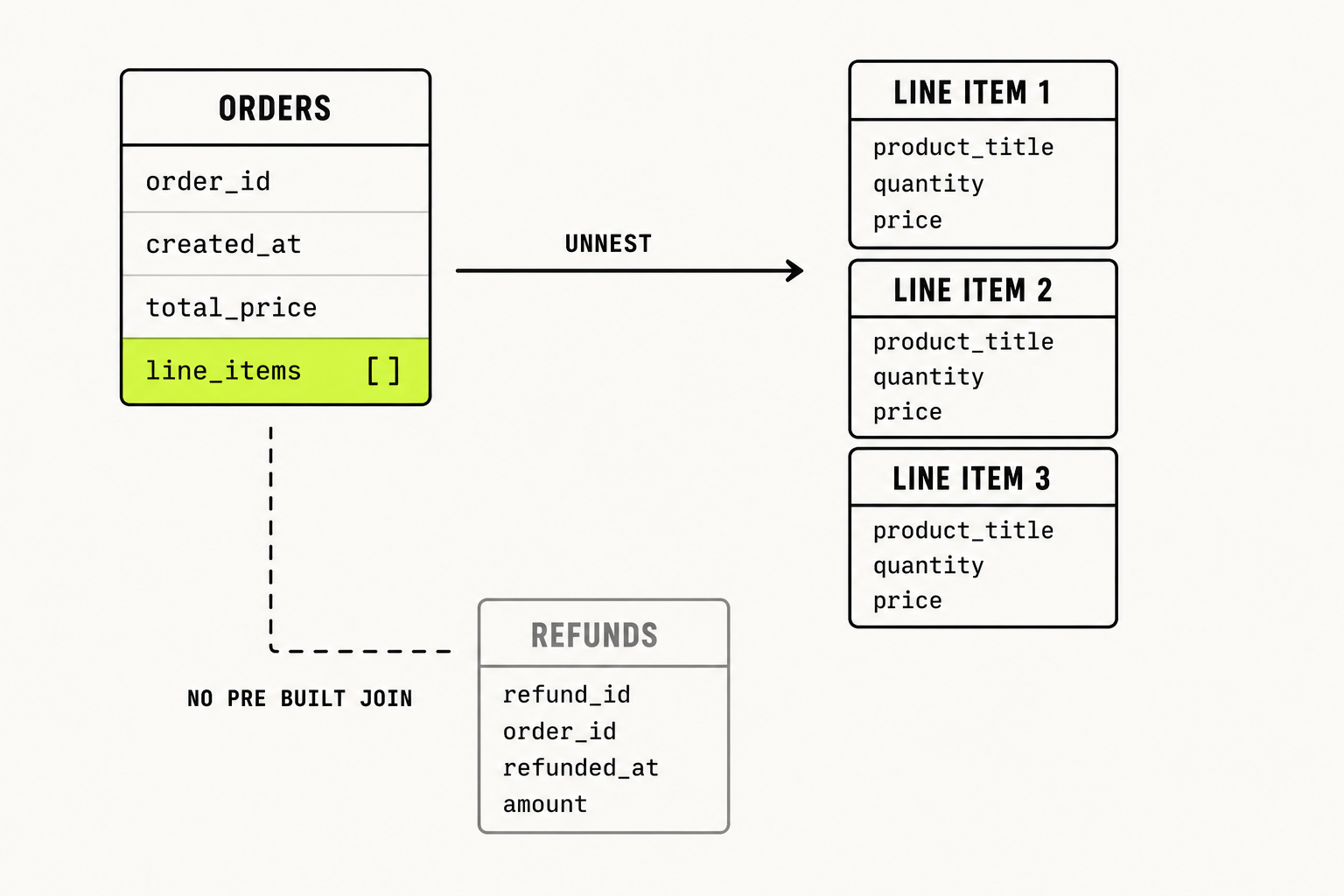
Line items are arrays, not rows
An order arrives as one row per order with a nested, repeated field containing the line items. If you SELECT an orders table and count rows, you are counting orders, not units.
To get one row per line item you have to unnest:
SELECT
  o.id                    AS order_id,
  o.created_at,
  li.title                AS product_title,
  li.quantity,
  li.price                AS unit_price,
  li.quantity * li.price  AS line_gross
FROM `project.shopify_raw.orders` AS o,
UNNEST(o.line_items) AS li
WHERE DATE(o.created_at) >= '2026-01-01';
Every downstream metric that mentions a product, a SKU or a unit runs through this pattern. Get it wrong once and the error propagates into every report you build afterwards.
Refunds sit in a separate table with no ready-made join
Refunds do not net themselves off the order. They land separately, they land later than the order they belong to, and there is no pre-built key waiting to connect them to a revenue figure.
This is the single most common cause of a warehouse showing higher revenue than Shopify. Gross is not net:
WITH gross AS (
  SELECT
    DATE(o.created_at)         AS order_date,
    SUM(li.quantity * li.price) AS gross_sales
  FROM `project.shopify_raw.orders` AS o,
  UNNEST(o.line_items) AS li
  GROUP BY 1
),
refunds AS (
  SELECT
    DATE(r.created_at) AS refund_date,
    SUM(r.amount)       AS refund_amount
  FROM `project.shopify_raw.refunds` AS r
  GROUP BY 1
)
SELECT
  g.order_date,
  g.gross_sales,
  COALESCE(rf.refund_amount, 0)                       AS refunds,
  g.gross_sales - COALESCE(rf.refund_amount, 0)       AS net_sales
FROM gross g
LEFT JOIN refunds rf
  ON g.order_date = rf.refund_date
ORDER BY 1 DESC;
Note what this query does not do. It does not attribute the refund back to the month of the original order. Whether you want it recognised on refund date or order date is an accounting decision, and you have to make it deliberately, once, and then hold it everywhere.
The join keys that make it a single source of truth
The point of single source of truth data ecommerce work is that one shared grain lets every system be compared against every other. In practice you need three keys.
Date. Everything reduces to a date. Align to one timezone, in one place, before anything else.
Order ID. Connects Shopify orders to refunds, transactions and fulfilments.
Channel or campaign. This is the one that lets you join Shopify data with ad spend. Shopify's order record carries UTM parameters from the landing session. Your ad platform tables carry campaign IDs and cost. The join is fragile, and it is the reason a shopify meta ads bigquery or shopify ga4 bigquery model needs a mapping table you maintain by hand rather than a clever automated match.
That mapping table is unglamorous and it is the highest value object in your entire shopify data pipeline.
PART 04The reconciliation table: why your Shopify data does not match your warehouse
Here is the part almost nobody publishes. When a founder says "the numbers do not match", they usually mean several different mismatches at once, and only some of them are bugs.
Print this table and pin it to the build.
| Comparison | Expected direction | Cause | Acceptable variance |
|---|---|---|---|
| Shopify order count vs BigQuery order count | Identical | None. If this is off, the pipeline is broken | 0% |
| Shopify gross sales vs sum of unnested line items | BigQuery higher | Discounts and refunds not netted | 0% after netting |
| Shopify daily totals vs BigQuery daily totals | Shifted by hours | Store timezone vs UTC in BigQuery | 0% after aligning |
| GA4 purchases vs Shopify orders | GA4 lower | Consent choices, ad blockers, client-side event loss | 5–10% |
| GA4 revenue vs Shopify net sales | Varies | Tax/shipping inclusion rules differ, refunds rarely sent to GA4 | Define the rule, then hold it |
| Meta reported purchases vs Shopify orders | Meta higher | Attributed, not incremental. Different question entirely | Not reconcilable. Do not try |
The row that causes the most wasted engineering time is the GA4 one. Shopify data discrepancies against GA4 are normal and expected, and the defensible working range for GA4-to-Shopify reconciliation is 5 to 10%. Anyone promising you tighter than that is either measuring something narrower than they claim or selling you something.
If Shopify reports do not match warehouse figures by more than 10% on order count, that is a pipeline fault and you should stop and find it. If it is GA4 sitting 7% below Shopify on purchases, that is Tuesday.
The last row matters most commercially. Platform-reported conversions and warehouse orders answer different questions and will never agree. We covered why in Platform ROAS Is Lying to You.
A daily reconciliation query worth scheduling
SELECT
  d.order_date,
  d.shopify_orders,
  d.ga4_purchases,
  SAFE_DIVIDE(d.ga4_purchases, d.shopify_orders) - 1 AS ga4_variance
FROM `project.marts.daily_reconciliation` d
WHERE d.order_date >= DATE_SUB(CURRENT_DATE(), INTERVAL 30 DAY)
  AND ABS(SAFE_DIVIDE(d.ga4_purchases, d.shopify_orders) - 1) > 0.10
ORDER BY d.order_date DESC;
Anything this returns is worth a look. Anything it does not return is working as designed.
Download the free checklist
The E-commerce Data Audit Checklist walks through the exact places revenue and spend drift apart across systems. Three pages, free, no email gate.
→ Get the checklistBook a 20-minute audit call
No deck. We look at your actual reconciliation gaps and tell you which ones are bugs and which ones are normal.
→ Book a callPART 05What a Shopify BigQuery integration actually costs per month
Nobody publishes the invoice, so here is ours. All figures are modelled for a stated brand profile — they are parameters, not industry benchmarks.
Modelled brand: roughly 8,000 orders per month, three years of order history, around 250,000 monthly sessions, GA4 export enabled, dashboards refreshed hourly during trading hours. FX assumption: 1 GBP = 1.28 USD. Google prices BigQuery in USD and regional rates vary.
The minimum viable stack
| Line item | Monthly USD | Monthly GBP |
|---|---|---|
| BigQuery active storage, 40 GB, first 10 GiB free | $0.60 | £0.47 |
| BigQuery on-demand queries, 2 TiB scanned, first 1 TiB free | $6.25 | £4.88 |
| Native Shopify connector, Preview | $0.00 | £0.00 |
| GA4 BigQuery export | $0.00 | £0.00 |
| dbt Core on GitHub Actions | $0.00 | £0.00 |
| Looker Studio | $0.00 | £0.00 |
| Total | $6.85 | £5.35 |
That is the honest answer to shopify bigquery cost for a brand this size. Under six pounds a month. The warehouse is not the expensive part and it never was.
BigQuery pricing ecommerce teams should understand comes down to two dials. Storage splits into active — any table or partition modified in the last 90 days — and long term, which is anything untouched for 90 consecutive days and drops by roughly half in price with no difference in performance or durability. Compute is charged on bytes scanned, with the first 1 TiB free each month and on-demand pricing at $6.25 per TiB at the time of writing. Verify the current rate on Google's pricing page, because it has moved before.
The realistic stack once ad platforms are in
| Line item | Monthly GBP |
|---|---|
| Minimum viable stack, above | £5.35 |
| Managed ETL for Meta Ads, Google Ads and Klaviyo | £70–£190 |
| Scheduled orchestration on Cloud Run | £4.00 |
| Total | £79–£199 |
Call it £95 a month at the midpoint. The variance is entirely in the ETL vendor, which is why the vendor choice deserves more scrutiny than the warehouse choice.
The cost nobody itemises is your own time. Two to four days to build the first useful version, then perhaps half a day a month. If that is not available, buying the finished model is cheaper than the salary equivalent of building it twice.
PART 06When you do not need a Shopify data warehouse yet
Most articles on this subject cannot bring themselves to write this section, because the author is selling the pipeline. So here it is.
Does a small Shopify store need a data warehouse? Usually not. Skip it, for now, if all of the following are true:
- You run one or two paid channels and can hold the numbers in your head.
- You are under roughly 500 orders a month.
- Your decisions are being made weekly, not daily.
- Nobody on the team writes SQL and nobody wants to learn.
- Your last three business decisions would not have changed with better data.
A warehouse solves a joining problem. If you do not yet have enough systems to have a joining problem, it adds maintenance without adding a decision. A well built spreadsheet and a disciplined weekly review will outperform a half-maintained pipeline every time.
Build it when one of these becomes true:
- You are spending across three or more channels and cannot say which is profitable after shipping and returns.
- You want cohort or LTV analysis and Shopify cannot produce it.
- Two people in the business quote different revenue figures for the same week.
- You are about to raise, and diligence will ask for numbers that survive a spreadsheet audit.
That last one is usually the moment. It is also usually six weeks too late to start.
PART 07Real time versus batch: how often should Shopify data land in BigQuery
The real time vs batch shopify bigquery question gets far more attention than it deserves.
Daily is right for almost every reporting use case. Hourly is right during peak trading weeks when you might move budget intraday. True real time, meaning webhook-driven ingestion within seconds, is right when the data triggers an automated action such as inventory or fraud logic, and almost never when a human is going to read it in a dashboard.
Streaming inserts also carry their own charges in BigQuery, while batch loading does not. Choosing real time for a report a person reads twice a day is paying a premium for latency nobody uses.
PART 08Frequently asked questions
How do I connect Shopify to BigQuery?
Three routes. Google's native BigQuery Data Transfer Service Shopify connector, which is free during Preview and takes under an hour. A managed ETL vendor, which makes sense when you need several sources. Or a custom pipeline on the Shopify GraphQL Admin API, which makes sense only for genuine real-time requirements.
Can you export Shopify data to BigQuery for free?
Yes, currently. Google's own documentation states there is no transfer charge while the Shopify connector is in Preview. You still pay BigQuery storage and query costs, which for a mid-sized brand come to under £6 per month.
How much does it cost to move Shopify data to BigQuery?
For a brand at roughly 8,000 orders per month using the native connector, around £5 per month all in. Once you add managed ingestion for ad platforms and email, expect £79 to £199 per month.
What Shopify data can you send to BigQuery?
The native connector supports orders, customers, products, variants, inventory, collections, fulfilments, refunds, transactions, abandoned checkouts and metafields. Gift cards require Shopify Plus.
Why does my Shopify data not match my warehouse?
Four usual causes, in order of frequency: refunds not netted off gross, line items counted as orders because of nesting, store timezone against UTC, and GA4 undercounting purchases by a normal 5 to 10% against Shopify.
Does a small Shopify store need a data warehouse?
Under about 500 orders a month with one or two channels, generally no. Build it when you cannot say which channel is profitable after shipping and returns.
PART 09Where this leaves you
The tooling for a shopify to bigquery build has stopped being the hard part. Google gives the connector away, BigQuery costs less than a coffee a month at this scale, and dbt Core and Looker Studio are free.
What is still hard is deciding what net revenue means, holding that definition across five systems, and building the mapping table that lets spend sit next to sales. That is a modelling problem, not a plumbing problem, and it is where every one of these builds either works or quietly stops being trusted — the same reconciliation problem we cover in why your dashboard isn't making you money.
If your numbers currently disagree with each other and you want a second pair of eyes on why, we run a free 20-minute audit call. No deck. We look at your actual reconciliation gaps and tell you which ones are bugs and which ones are normal.
Sources. Native Shopify connector in BigQuery Data Transfer Service, supported objects, no transfer cost during Preview, gift cards require Shopify Plus (Google Cloud documentation, primary). BigQuery free tier of 10 GiB storage and 1 TiB on-demand queries per month, active vs long-term storage definitions and the roughly 50% price drop after 90 days, on-demand compute at $6.25 per TiB scanned at time of writing (Google Cloud pricing, primary; re-check on publish day). GraphQL Admin API calculated query cost, 1,000-point single-query maximum, and bulk operations exempt from max-cost and rate limits (Shopify developer documentation, primary). Fivetran free plan to 500,000 MAR with a $5 base charge on paid connections; Airbyte Cloud Standard from $10/month including 4 credits, Core self-hosted free (vendor pricing pages, checked 26 July 2026). Shopify's own reporting queries Shopify data only and cannot pull ad spend, structurally, not by plan tier (Shopify reports documentation, corroborated across multiple 2026 sources). The "90 days of Shopify data" retention claim is deliberately not stated as fact here — it traces only to vendor content citing other vendor content, not to Shopify's own documentation. The claim that GA4 reconciles to Shopify within 2% is similarly excluded as unsupported; the 5–10% range used throughout is the defensible one. Exact entry prices for Coupler.io, Windsor.ai and Dataslayer are presented as an indicative band rather than fact, since secondary listings conflict by more than 100%.